
Worming from Home How to Complete Tasks
Mail, sheets, and the phone — done as a worm, filed as a human.
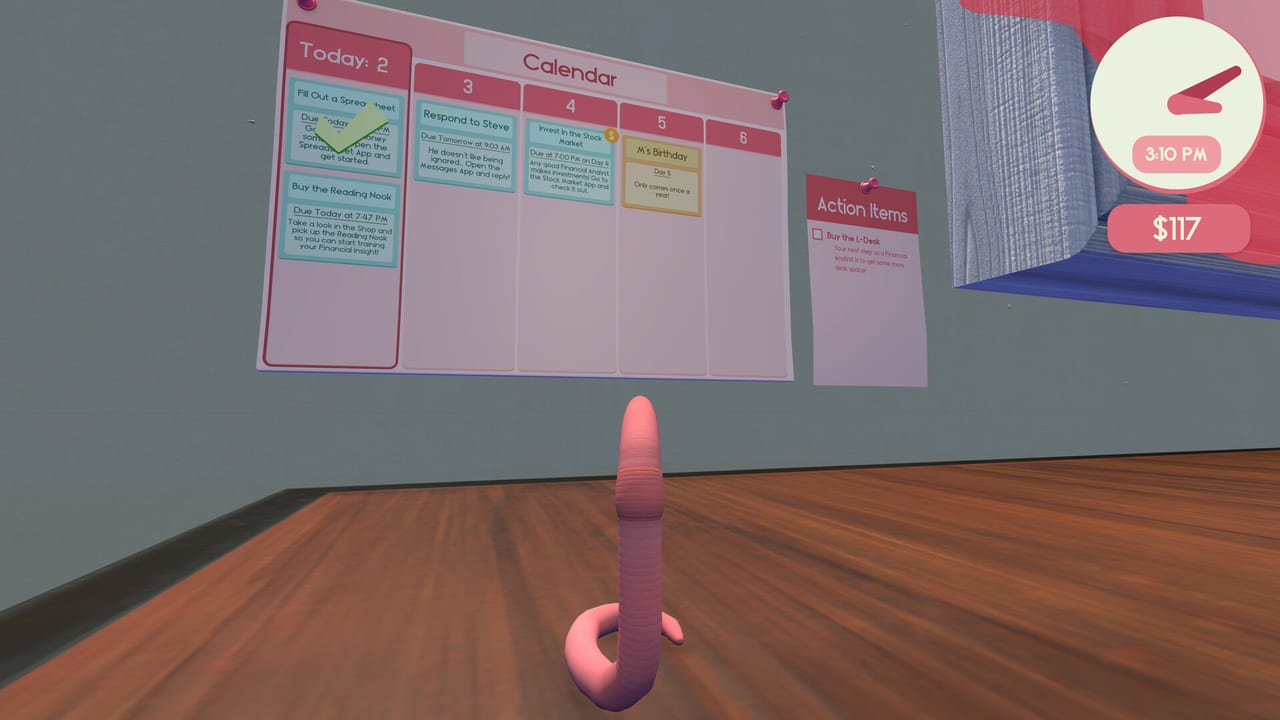
The task board is the campaign structure. Worming from Home does not send you to a second map so much as it stacks jobs on the same square of wood. This page is the how-to-complete, how-to-find, and how-to-not-look-incompetent guide. Movement basics stay in How to Play. Money from finishing work feeds the stock market and the upgrade ranking. The title those jobs are supposed to earn is covered in How to Get Promoted.
How the board thinks
Cards appear with a verb, a constraint, and sometimes a timer. Launch coverage described mail from colleagues, spreadsheet busywork, pattern or math checks, and at least one sheet that wanted a physical measurement (height) copied off the world. That mix is the whole design: some cards are typing tests, some are exploration, some are social landmines. Read the whole card before you bounce toward the keyboard. A formula that needs a capital A is a different commute than a one-word Slack reply.
If two cards are up, pick the one whose tools you are already standing on. Switching from the number row to the phone and back is how you miss both timers. The game is a comedy of commuting.
Email and chat
Playthroughs describe boss and coworker messages that want short, almost one-word answers. That is not an excuse to face-roll the keyboard. Open the thread on the monitor with camera lock, park on the reply field, and type the word the card asked for. Send is a mouse click, which means a second commute to the mouse. If you Send garbage, you have created a new roleplay problem and maybe a failed card.
Do not take a video-call or webcam job at face value. The shop sells a webcam and the joke is obvious: the intern, the boss, and the internet should not see a worm. If a card wants you on camera, either hide, decline, or use the toy in a way the card actually allows. When in doubt, finish the text jobs first.
Spreadsheets
Sheets are the skill check. You will type numbers that look like busywork, and you will also type formulas that the cell actually evaluates. Demo footage shows players missing capitals, missing operators, and missing the fact that the sheet wanted a value from the desk (height, a label, a sticky note). Procedure:
- Lock the monitor. Confirm the active cell.
- If the card names a real-world value, leave the keys, find the object, remember the number, commute back. Do not guess.
- For formulas, type the operator keys as platforms. Plan Shift if the formula wants symbols that live on the number row.
- Confirm on the monitor before you celebrate. A wrong cell with a right number is still wrong.
Advanced sheets unlock with progression and pay more. The in-game helper’s perk speech (the Clippy-shaped mascot from launch coverage) ties harder files to training items in the shop. If a sheet is gated, you do not have a missing guide — you have a missing purchase. Check the upgrade tier list.
The phone
You have a junior-analyst phone. Picking up is a physics job. Hanging up is also a physics job: trailers and previews show hopping onto the disconnect control when you would rather not take the call. That is a valid complete if the card is “deal with the phone,” and a failed complete if the card is “reassure the client.” Read the verb.
Do not take a call while balanced on the mouse. The animation will fling you. Park on the wood, then commit.
Fetch, explore, and “find” cards
When a card asks you to insert a height, locate a trinket, or check something behind the monitor, treat the desk like a tiny Metroidvania. Look at the underside of objects, the far mousepad, the mug, the sticky notes, and the floor only if you have a way back. The worm hole is a separate purchased space, not a required step for ordinary office cards. If you bought the portal by accident, you can still finish the workday on the desk; the shadow-realm boxes are optional rage content.
Timers without panic
Some cards are strict. The store also lists the game as playable without timed input / QTEs, which is about prompt timing, not about the board ignoring clocks. If a timer is tight, skip the hat shopping. If you already failed, take the next card instead of restarting the whole morning unless the day is a wash. Worm-Life Balance is for the gaps between cards, not for the last thirty seconds of a sheet.
A clean work block
- Two mails, one sheet, one phone. Then shop or gym.
- Keep the mouse in a remembered parking spot.
- Reset objects if a tool left the desk.
- Stop after a fail-chain. The physics get worse when you mash.
When the board is empty and the bonus is burning a hole in your account, go rank purchases. When the board is empty and the boss still sounds unimpressed, go to promotion. When a patch changes a job, check launch notes.
Frequently Asked Questions
Quick answers to the most common questions.
How do I hang up the phone?
Physically reach the disconnect control and hop on it. Confirm the card wanted you to end the call, not to stay on the line.
A spreadsheet wants my height. Where is it?
On the desk, not in a menu. Search objects and notes, then type the number you actually found.
Should I answer every call?
Only if the card requires a conversation. Some jobs are solved by hanging up before anyone hears you.
Why is a harder sheet locked?
Progression and shop training items gate advanced files. See the upgrade ranking and promotion pages.